Key Driver Analysis: Find Out What Actually Moves Your NPS
NPS tells you THAT something is wrong. Key driver analysis tells you WHAT. Here is the method that turns a score into a prioritised action plan.
- NPS tells you that something is wrong. Key driver analysis tells you what. Without it, most CX teams prioritise by gut feel.
- The method uses regression to find which factors statistically drive the score, not just what customers say matters. The two answers are often very different.
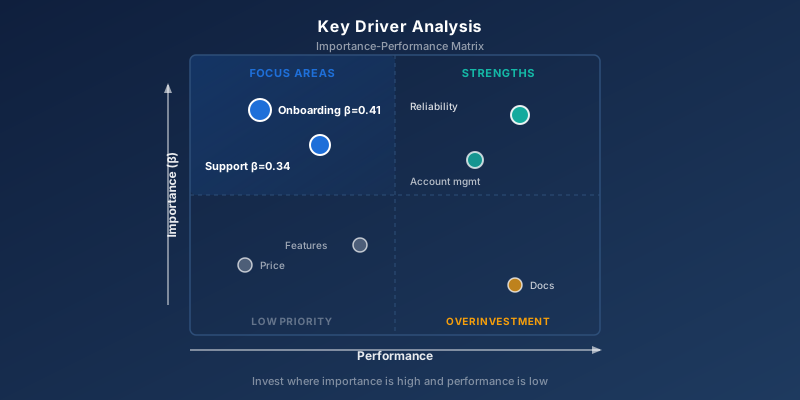
- Results are plotted in an importance-performance matrix with four quadrants. Focus on "high importance, low performance" for the biggest impact per pound invested.
- Aim for at least ~150 respondents. Below that, the beta weights become unstable and you risk prioritising noise.
NPS Tells You Something Is Wrong. But What?
Your quarterly NPS has dropped from +42 to +31. Leadership wants to know why, and what you intend to do about it. You open the dashboard and see ten touchpoints, each with its own satisfaction score. Support scores 4.1. Onboarding 3.8. Product 4.3. Price 3.2.
Which one should you prioritise?
Intuition says price, because it scores lowest. But what if price doesn't actually drive loyalty in your industry? What if onboarding determines whether customers become Promoters or Detractors, and price is just something everyone complains about regardless?
That is exactly the question key driver analysis answers.
What Is Key Driver Analysis?
Key driver analysis (KDA) is a statistical method that identifies which factors have the largest effect on an overall metric such as NPS, CSAT, or CES.
The method typically relies on multiple regression. You take your dependent variable (the NPS score) and your independent variables (scores on individual touchpoints, features, or service elements) and calculate how much each driver contributes to explaining variation in the overall score.
The output is two numbers per driver:
- Importance (derived importance) — how much the driver actually moves the score
- Performance (current score) — how well the driver is performing today
The combination tells you where to focus.
Why You Need It
Because what customers say is important and what statistically drives their score are two different things.
A classic B2B SaaS example: customers consistently rank price as the most important factor in a direct survey. But when you run KDA on the same NPS data, price typically appears near the bottom. The real drivers are onboarding speed, support quality, and product reliability.
That doesn't mean customers lie. It means they rationalise. Price is easy to articulate. The underlying feeling ("this is a product I can rely on") is hard to put into words but actually determines loyalty.
Without KDA, you prioritise on what customers say. With KDA, you prioritise on what works.
How the Method Works
In multiple linear regression, the algorithm finds the combination of drivers that best explains variation in your outcome variable:
NPS = β₀ + β₁·(support) + β₂·(onboarding) + β₃·(price) + ... + ε
The standardised beta weights (β) tell you how many standard deviations NPS moves when an individual driver moves by one standard deviation. The larger the absolute β value, the more important the driver.
The R² value tells you what share of the variation in NPS your drivers collectively explain. A solid KDA result typically falls between 0.40 and 0.70. If R² is below 0.30, you are probably missing important drivers from your dataset.
Watch out for multicollinearity: if two drivers are highly correlated (e.g., "product reliability" and "product quality"), regression cannot separate their individual effects. Test with VIF (Variance Inflation Factor) — values above 5 are a warning, above 10 a problem.
The Importance-Performance Matrix
The most common visualisation is a 2×2 matrix. Importance (derived) on the y-axis, performance (mean score) on the x-axis. The four quadrants:
| Quadrant | Importance | Performance | Action |
|---|---|---|---|
| Focus areas | High | Low | Invest here first. Highest ROI. |
| Strengths | High | High | Maintain and market. Your competitive advantage. |
| Overinvestment | Low | High | Stop spending resources here. Customers don't value it. |
| Low priority | Low | Low | Ignore for now. Monitor for change. |
The rule is simple: always start in "Focus areas". That is where you move the most customers from Detractor to Promoter per pound invested.
How to Run a KDA in 6 Steps
1. Define your outcome variable
Typically NPS, but it can be CSAT or CES. Pick the metric that best represents what you want to drive. If the goal is to reduce churn, CES is often better than NPS.
2. Identify potential drivers
Usually 8-15 drivers. For B2B SaaS: product reliability, feature breadth, support response time, support quality, onboarding, price, account management, documentation, release cadence. Too few drivers: you risk missing important ones. Too many: multicollinearity and unstable results.
3. Collect data
Each respondent gives you both NPS and a score (typically 1-5 or 1-7) on each driver in the same survey. Aim for at least 150 respondents. Ask the driver questions before NPS so the NPS question doesn't colour the driver scores.
4. Run the regression
Multiple linear regression with NPS as the dependent and drivers as independent variables. Check R², VIF, and p-values. Drop drivers with high VIF (or combine them).
5. Plot the importance-performance matrix
Importance = standardised beta weight. Performance = mean score on the driver. Add median lines on each axis so the quadrants are clearly visible.
6. Prioritise and execute
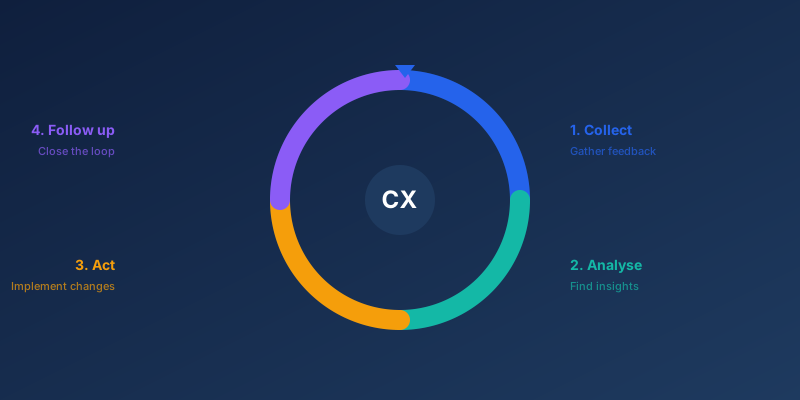
The focus-areas quadrant is your roadmap. Build improvement initiatives around the 2-3 drivers furthest to the top-left. Everything else waits. And remember: without closing the loop, the insight never becomes action.
A Real-World Example
A B2B SaaS company we worked with had NPS +28 and wanted to reach +45 within a year. The product chief wanted to invest in new features. The CFO wanted to cut the price. The support chief wanted to hire more agents.
We ran a KDA on their 340 most recent NPS responses. The result:
| Driver | Performance | Importance (β) | Quadrant |
|---|---|---|---|
| Onboarding experience | 3.2 | 0.41 | Focus |
| Support quality | 3.8 | 0.34 | Focus |
| Product reliability | 4.4 | 0.29 | Strength |
| Account management | 4.1 | 0.22 | Strength |
| Feature breadth | 3.9 | 0.11 | Low priority |
| Price | 3.1 | 0.08 | Low priority |
| Documentation | 4.2 | 0.06 | Overinvestment |
The "obvious" price investment would have moved the score by less than 1 point. Onboarding and support together explained 75% of the variation in NPS.
The company redesigned onboarding, expanded the support team, and didn't touch price. Seven months later, NPS stood at +46.
Common Pitfalls
Too few respondents. Below 100, the beta weights become so unstable you risk prioritising noise. Wait until you have enough data, or accept that the result is indicative only.
Multicollinearity. Highly correlated drivers (e.g., "support speed" and "support quality") make regression unstable. Check VIF. Combine or drop drivers that are almost identical.
Mistaking correlation for causation. KDA shows association, not causation. Support quality correlating strongly with NPS doesn't automatically mean that improving support will lift NPS. Validate with A/B tests or qualitative interviews.
Ignoring segments. Drivers vary across segments. Enterprise customers' NPS is driven by account management. SMB customers' NPS is driven by self-service. Run separate analyses per segment if your customer groups differ.
Stopping at the analysis. KDA without follow-through is an academic exercise. The result must feed into the product roadmap and OKRs, or nothing changes.
When KDA Is Not the Answer
KDA is not a silver bullet. Avoid it when:
- The dataset is too small. Below 100 respondents, results are too unstable to act on.
- You lack variation in the outcome. If every respondent gives NPS 9-10, regression cannot find drivers. The model needs both satisfied and dissatisfied customers.
- The question is qualitative. "Why did you choose us over the competitor?" is better answered through interviews than regression.
- You want to discover new drivers. KDA tests the drivers you ask about. To uncover unknown drivers, qualitative interviews and text analysis of open-ended responses are better.
Getting Started
Companies that use key driver analysis move their NPS faster than those who prioritise by gut feel. Not because their CX teams are smarter, but because they know exactly where to invest.
If you have NPS and at least 150 respondents with driver scores, you can start tomorrow. Start simple: 8-10 drivers, one regression run, one matrix. Prioritise the 2-3 initiatives that sit furthest to the top-left. Measure in six months.
And remember: the analysis is only half the work. The other half is closing the loop and actually executing on what you find.
Frequently Asked Questions
LINEST function for multiple regression, and the Data Analysis Toolpak has a Regression dialog that is easier to use. For a simple KDA with 5-10 drivers it is entirely sufficient. For larger datasets or more advanced methods such as Shapley or Random Forest, use R, Python, or a dedicated platform.Ready to know what your customers actually think?
SurveyGauge helps Nordic B2B companies move from gut feeling to data-driven CX decisions.
SurveyGauge Team
Customer Experience Experts
SurveyGauge-teamet hjælper virksomheder med at måle og forbedre kundetilfredshed via professionelle surveys, analyser og rådgivning.
You might also be interested in
View all articles![What Is NPS? The Complete Guide to Net Promoter Score [2026]](/img/knowledge/nps.svg)
What Is NPS? The Complete Guide to Net Promoter Score [2026]
NPS is the most widely used loyalty metric in the world, and also the most frequently misused. Indeed, the score means nothing without follow-up. Here is how to use it properly.
Voice of Customer (VoC): The Complete Guide to Your Program
VoC is not a survey programme. Instead, it is a system for continuously understanding what customers need, what frustrates them, and what drives them to stay. Here is how to build one that works.